ABC Kids: Tracing & Learning
- 4.3
- Rating
- 10.00M
- Installs
- Free
- Price
 Analysis by App-foxy
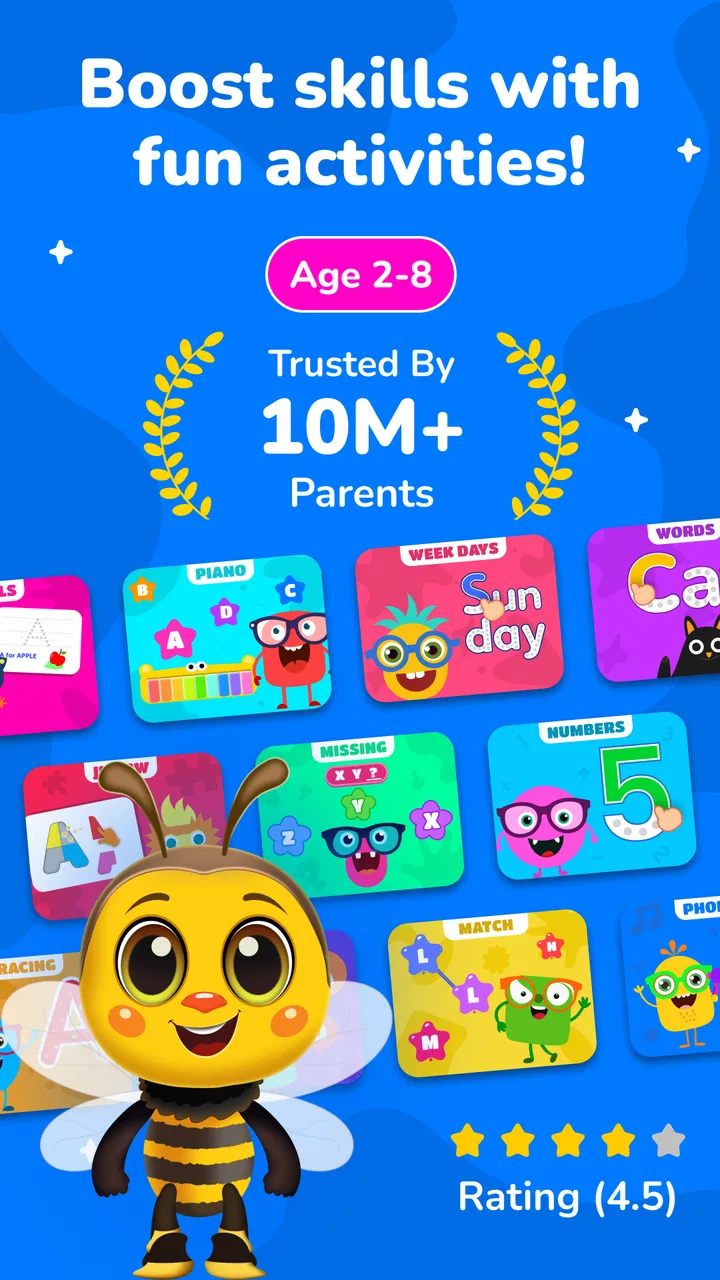
ABC Kids: Tracing & Learning is the kind of educational game I can imagine opening during a quiet afternoon when a child wants something to do and an adult wants that screen time to have a clear purpose. It brings together letter practice, phonics, tracing, balloon popping, jigsaw-style play, and other small activities rather than asking children to stay with one lesson for too long. That variety is its strongest first impression: the experience feels more like a playful learning box than a single exercise repeated from start to finish.
I reviewed it as a game for young learners, and my overall reaction is positive, with one important qualification. It works best when an adult treats it as a short practice tool, not as a complete replacement for reading aloud, handwriting, conversation, or classroom instruction. The free entry point makes it easy to try, while optional purchases ranging from $2.99 to $49.99 per item mean families should look carefully at what is available before making the game part of a regular routine.
A cheerful first impression that keeps learning approachable
The visual direction is immediately understandable. Bright colors, large objects, friendly letter-focused scenes, and simple interactions create a welcoming mood for children who may not yet be comfortable with formal lessons. Nothing about the presentation suggests that a child is being tested in a serious or intimidating way. Instead, the game uses the visual language of early-learning play: tap, trace, match, complete, and try again.
You May Also Like

 Blood Strike: 2.5 Anniversary
Blood Strike’s Loadouts Turn Every Drop Into a Tactical Gamble
A close look at Blood Strike’s custom loadouts: how fast access to signature weapons reshapes its battle royale rhythm, rewards preparation, and narrows the gap between fights.

 Pandora - Music & Podcasts
Pandora’s Music Is Easy to Start, but Harder to Recover
Pandora’s strength is its low-effort path from a seed to a station. Its weak spot is how much confidence it asks you to place in connection, setup, and quiet recovery.

 8 Ball Pool
 Is Built on Rivalries, Rematches, and Routine
A close look at the rivalries, rematches, shared routines, and unanswered safety questions that turn a quick pool match into a persistent mobile community.

 Samsung Music
’s Quiet Strength Is Playing What You Already Own
Its reach comes less from spectacle than from dependable access to a personal library. That simplicity is both the app’s strongest retention engine and its ceiling.

 AccuWeather: Weather Radar
AccuWeather Review: A Quick, Clear Forecast for Everyday Decisions
For everyday plans, the best forecast is the one you can understand quickly. AccuWeather makes rain timing, radar, and local conditions easy to act on, with a few trade-offs.

 Hill Climb Racing
Why Hill Climb Racing Still Turns Crashes Into One More Run
A tiny car, a bumpy hill and one more upgrade: Hill Climb Racing keeps resurfacing because its simple chaos makes every near-miss feel personal.
More From Our News Desk



That simplicity matters. A preschool learner does not need a complicated menu or a dense dashboard before reaching the activity. The appeal comes from recognizing a letter, following a path, popping something on screen, or fitting pieces together. These actions give the child an immediate response and make the lesson feel active. In my experience, that is more inviting than an app that places a worksheet-like page in front of a young user and expects sustained attention.
The setting is not built around a deep fictional world, and that is appropriate here. The game’s “world” is a collection of familiar learning situations rather than a story with characters, missions, and extensive lore. Its art direction supports recognition instead of distraction. A letter should remain the focus, and the surrounding color and motion are there to make practice less dry.
The best use of the presentation is as a gentle invitation to begin. A child can move from one activity to another without feeling that every mistake has a heavy consequence. That low-pressure tone is valuable for early learners, especially those who become discouraged when handwriting or letter recognition is still developing.
ABC Kids: Tracing & Learning is published by BayBee Brain and is listed as a free game in the educational category. It is suitable for Everyone, runs on Android starting with version 6.0, and the current version is 8.6. Those details make it accessible to families using older compatible devices, although the actual comfort of play will still depend on screen size and responsiveness.
Who is likely to enjoy the opening minutes?
I would recommend starting with children who are beginning to notice letters, sounds, and simple visual patterns. The game should also suit a child who loses interest quickly when an activity feels repetitive, because the mix of tracing, phonics, popping, and puzzles offers several ways to return to the same learning theme. A parent can use one activity for a few minutes, then switch before frustration sets in.
It is less suitable for a child who already needs structured reading instruction beyond early alphabet practice. Older learners may find the visual style and basic interactions too young, while children who need targeted support with a particular sound may benefit more from a focused educational tool chosen with a teacher or specialist.
How the game communicates through its visual language
The most effective design choice is the way the activities explain themselves through familiar visual cues. Tracing asks the child to follow a shape. Puzzles ask the child to identify how pieces belong together. Balloon popping turns a simple tap into a reward. These are not complicated systems, but they communicate clearly without relying on long written instructions that a beginning reader cannot yet understand.
That makes the game especially useful before a child can read menus independently. An adult may still need to help with navigation, but once an activity is open, the visual goal is usually easier to grasp than a text-heavy lesson. The game’s world language is therefore based on action: letters are things to recognize, sounds are things to connect, and shapes are things to complete.
Tracing deserves particular attention because it connects the screen to a skill children eventually use with pencil and paper. A child can practice the direction and outline of a letter with a finger, which may help build familiarity before handwriting becomes comfortable. I would not treat this as a substitute for real writing, though. Touchscreen tracing can be forgiving in ways paper is not, so I would follow it with a quick offline activity such as drawing the same letter on a piece of paper.
That combination reveals a useful workflow that is easy to miss: use the game to introduce or refresh a letter, then immediately transfer the idea to a physical surface. The digital activity supplies repetition without needing a stack of worksheets, while the paper exercise shows whether the child has understood the shape rather than simply followed a glowing path.
The phonics element also benefits from adult participation. A child may tap through a sound activity and enjoy the result, but hearing an adult repeat the sound, stretch it, and connect it to a familiar word gives the exercise more meaning. I found the game more valuable when treated as a prompt for conversation: “What sound did you hear?” “Can you think of another word?” “Can you find this letter on a sign or in a book?”
Why the activity variety matters
The different formats are not interchangeable. Tracing supports hand control and letter shape memory. Phonics supports the connection between symbols and sounds. Balloon popping adds quick reactions and immediate rewards. Jigsaw play shifts attention toward visual matching and completion. That means a parent can choose an activity based on the child’s mood rather than asking every session to do the same job.
For example, after a tiring day, a short popping activity may be an easier entry point than handwriting practice. On a calmer morning, tracing can receive more attention. If a child is becoming upset, a puzzle can provide a change of pace without abandoning the learning theme completely. This is a more practical approach than assuming one activity will suit every moment.
There is also a trade-off. Variety can keep the experience fresh, but it can make progress feel less obvious than in a tightly focused alphabet course. A parent who wants a clear sequence from one letter to the next may need to provide that structure personally. I would choose a small goal before handing over the device, such as practicing a few letters or revisiting one sound, instead of letting the child jump randomly through everything available.
Sound, rhythm, and the emotional pace of play
The sound design supports the game’s upbeat mood rather than trying to create a dramatic adventure. Short feedback sounds and playful responses help a child understand that an action registered. This is important for tracing and puzzles, where the child needs confirmation that a movement or placement was accepted.
In my view, the rhythm is more important than the individual sounds. The game moves in short bursts: act, receive feedback, and continue. That pacing fits young attention spans better than long explanations. It also makes the experience easy to fit into everyday life. A parent can use it during a brief waiting period, before dinner, or as a transition between activities without committing to a long session.
Still, energetic feedback can become tiring if a child plays for too long or repeats the same action continuously. I would keep the volume comfortable and use the game in short sessions, especially in a shared room or near bedtime. The cheerful tone is useful for motivation, but it is not automatically calming. Families looking for a quiet wind-down activity may prefer reading together instead.
The sound and pacing also influence how mistakes feel. When an error does not stop the entire experience, a child is more likely to try again. That is a good fit for early learning, where confidence matters. At the same time, adults should watch for guessing. A child may tap quickly because the response is entertaining, without actually looking at the letter or listening to the sound. Slowing the session down and asking the child to explain the answer can turn fast play into meaningful practice.
How the mechanics support early learning
The mechanics are deliberately simple, and that is both their strength and their boundary. Tapping, dragging, tracing, popping, and assembling puzzles are easy to understand on a touchscreen. They do not require advanced reading ability, complicated controls, or a long explanation. For a young child, that low barrier is more useful than a sophisticated progression system would be.
I particularly like the way tracing and puzzle play balance each other. Tracing is controlled and deliberate, while a jigsaw activity is more about visual problem-solving and recognition. Moving between them can prevent the session from becoming a test of patience. The balloon activity adds a faster rhythm, giving the child a chance to reset attention before returning to a slower task.
One practical tip is to avoid using the game only as a reward after every correct answer. If the child learns that the goal is simply to reach the most exciting activity, tracing and phonics may be rushed. Instead, I would let the child choose between two activities and ask for a small amount of attention in each. That keeps the sense of agency while preserving the learning purpose.
Another useful approach is to observe the type of help the child needs. If the child can identify a letter but struggles to trace it, the issue may be hand control rather than recognition. If tracing is easy but the sound is forgotten, more spoken practice may be needed. The game can reveal these differences, but it cannot diagnose them. Its value is in giving an adult a quick, visible way to notice where a child is comfortable and where extra support is useful.
The game is free to start, which lowers the risk of trying it. However, optional in-app purchases cost between $2.99 and $49.99 per item. That range is significant enough that I would review purchase choices together with the child rather than allowing repeated tapping through a payment flow. A free game can still create pressure when a child wants every available activity, so setting expectations early is sensible.
Its broad reach is reflected in an average rating of 4.5 from around 13 thousand ratings and more than 5 million installs. Those figures suggest that many families find the format appealing, but they do not guarantee that it will match every child’s learning style. I would still test the free experience on the actual device, paying attention to whether the child follows the task or simply chases the animations.
Where it fits beside familiar alternatives
Compared with alphabet videos, this game asks the child to do something rather than only watch. That makes it a better choice when the goal is active recognition or finger practice. Compared with paper worksheets, it offers quicker feedback and more variety, but it cannot replace the resistance, grip, and spatial feel of a pencil. Compared with a dedicated phonics program, it is broader and more playful, but likely less focused for a child who needs systematic sound instruction.
Those differences make the game strongest as part of a small learning rotation. I would pair it with books, spoken word games, drawing, and physical puzzles. The digital activities can introduce a letter or refresh attention, while offline practice can build skills the screen cannot fully reproduce. Families wanting one complete curriculum may find the experience too open-ended; families wanting an accessible supplement may appreciate exactly that flexibility.
Everyday use: a realistic short session
Imagine a child waiting while a parent finishes an appointment. Instead of opening a general video app, the parent starts with a tracing activity and chooses one or two letters to revisit. After a few attempts, the child moves to a puzzle for a change of pace. The parent then asks the child to name the letter and make its sound aloud. The whole routine stays short, but it combines touch, sight, sound, and conversation.
That scenario shows the game at its best. It gives the child something engaging to do, but it also gives the adult a natural reason to participate. The adult does not need to sit over every second of play, yet a quick question or connection to a real object can make the activity much more educational than passive tapping.
I would avoid using it when a child is already overstimulated, hungry, or close to sleep. The bright presentation and quick responses may make stopping harder, particularly if the child is moving between several activities. A clear endpoint helps: finish one puzzle, complete one tracing attempt, or stop after a short timer. The game works better with a boundary than as an unlimited background distraction.
Device fit, age, and family expectations
The Everyone content rating makes the game appropriate for a broad family audience, especially children at the beginning of alphabet learning. That does not mean every child will find it equally suitable. A very young learner may need help holding the device and understanding where to tap, while an older child may want more challenge than the activities provide.
The Android requirement of version 6.0 or later is modest, which is helpful for households that do not use the newest phone or tablet. A larger screen remains preferable for tracing because small displays leave less room for comfortable finger movement. Before making it a regular activity, I would check whether the child can see the letters clearly and whether accidental touches are common on the chosen device.
Parents may also wonder whether the game is worth paying for beyond the free starting point. My answer depends on usage. If the child returns willingly to tracing and phonics and the available free content already supports a routine, there is no need to purchase immediately. If the child uses it often and the optional material adds useful variety, a purchase may make sense, but I would decide based on learning value rather than on the child’s excitement about unlocking more colorful play.
The developer, BayBee Brain, has kept the core concept easy to understand: early learning delivered through several small game formats. The current version, 8.6, indicates an actively maintained product line, but the more important question for a family is still whether the activities fit its child. Numbers and popularity can encourage a trial; they should not replace observation.
My atmosphere verdict
ABC Kids: Tracing & Learning creates a coherent mood by keeping its art bright, its interactions familiar, and its rhythm short. The game does not need a complicated story because its setting is the learning space itself: letters, sounds, shapes, and small moments of success. The atmosphere is friendly without being demanding, and the mechanics generally support that tone instead of fighting it.
My main reservation is that the cheerful variety can blur the learning path if an adult never sets a goal. The game is also not the right choice for advanced readers, children seeking a deeper challenge, or families that want a fully structured phonics curriculum in one place. Its optional purchases deserve attention as well, particularly when a child is using the game independently.
For a preschool learner who responds well to colorful touch activities, I think it is worth trying. I would use it in short sessions, connect its letters and sounds to books and real-world objects, and follow tracing with occasional pencil practice. Used that way, the game feels less like digital babysitting and more like a flexible little practice station.
My recommendation is to treat it as a playful supplement: approachable, varied, and useful when an adult gives the session a small purpose. The free price makes that experiment straightforward, while the mix of tracing, phonics, popping, and puzzles gives children several ways to stay engaged with early alphabet skills.
FAQs for ABC Kids: Tracing & Learning
01What age group is ABC Kids: Tracing & Learning suitable for?
ABC Kids: Tracing & Learning is designed for children aged 2 to 5 years old. It's tailored to engage preschoolers with fun and educational activities that focus on letter recognition and phonics. The app provides a safe and interactive environment for young learners to explore the basics of the alphabet.
02Does ABC Kids: Tracing & Learning require an internet connection?
No, ABC Kids: Tracing & Learning does not require an internet connection to function. Once downloaded, all features and activities are available offline. This makes it a convenient option for parents who want to keep their children entertained and learning on the go, without worrying about data usage.
03Are there any in-app purchases or advertisements in ABC Kids: Tracing & Learning?
ABC Kids: Tracing & Learning is free from in-app purchases and advertisements. This ensures a distraction-free learning experience for children. Parents can have peace of mind knowing that their kids won’t accidentally make purchases or be exposed to potentially inappropriate ads while using the app.
04What educational features does ABC Kids: Tracing & Learning offer?
The app offers a variety of educational features, including letter tracing, phonics exercises, and interactive alphabet games. These activities are designed to help children develop their fine motor skills, letter recognition, and early reading abilities in a playful and engaging way. The app uses colorful graphics and sounds to maintain the child's interest.
05Is ABC Kids: Tracing & Learning available on both Android and iOS?
Yes, ABC Kids: Tracing & Learning is available for download on both Android and iOS platforms. It can be easily found on the Google Play Store and the Apple App Store, making it accessible for users regardless of their device preference. Simply search for the app and follow the prompts to download and install it.
Pros
- Interactive tracing activities enhance learning.
- Colorful graphics keep children engaged.
- User-friendly interface for easy navigation.
- No ads
- ensuring a safe environment.
- Supports multiple languages for diversity.
Cons
- Limited content may lack long-term appeal.
- Requires internet for additional features.
- Lacks parental control options.
- Some activities may seem repetitive.
- No progress tracking for parents.

ABC Kids: Tracing & Learning
Gallery